
The Invoice/Receipt must be issued subject to the following requirements:
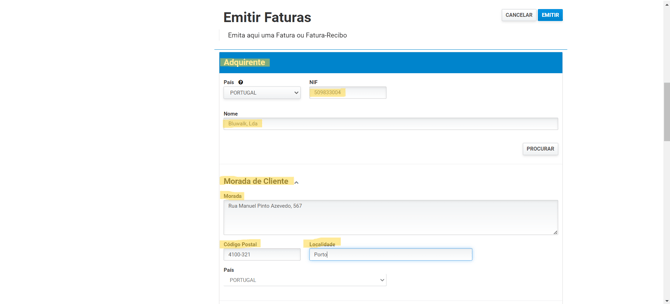
- On the Finanças website, you must select "Emitir Fatura."
- Follow the steps below.
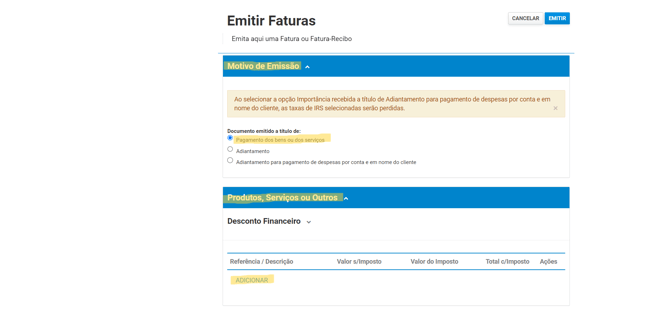
- Reason for issue select "Pagamento dos bens ou dos serviços And below, select "Adicionar."
- Follow the steps below to add the requested information.
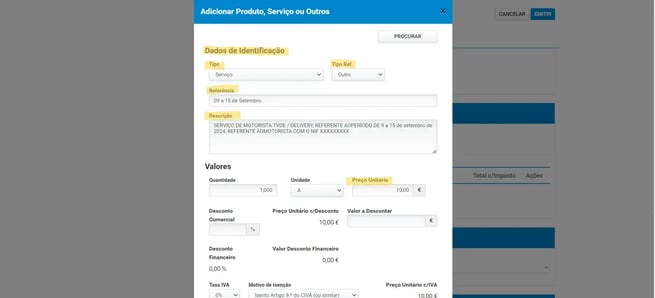
- In the description:
Copy the text displayed on the Earnings page of the portal into the invoice description.
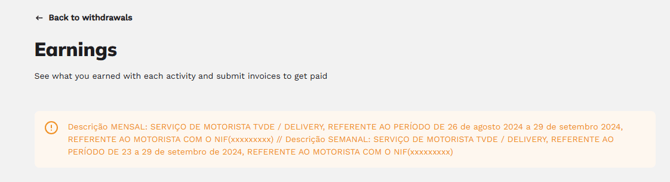
This text already includes the period covered by the invoice and your tax identification number, and it is available in two versions — monthly and weekly. Use the version that corresponds to your payment cycle.
We update this text regularly, so copy it at the time you issue the invoice rather than using a version you saved from a previous period.
-
VAT treatment — Please check with the Portuguese Tax Authority (Finanças), an accountant, or through the online consultation of your tax regime to determine whether or not you are subject to VAT.
If you are under the VAT exemption regime, issue the invoice without VAT. Otherwise, select Mainland Portugal — 23%.
This rate applies to the service you provide to us and is unrelated to the 6% VAT on rides, which applies to the amount paid by the passenger and is paid to the State by Bluwalk. These are two different things and should not be added together.
In the submission form on our portal, enter the amount excluding taxes. We will verify the taxes included on the invoice before accepting it.
- IRS Withholding Tax:
This is not something you can choose; it depends on the amount you have invoiced.
If your income as a self-employed service provider was less than €15,000 in the previous year, you are exempt from withholding tax — although you may still request that tax be withheld.
Above this amount, withholding becomes mandatory and applies from the month following the one in which you exceed the threshold. Please confirm your situation with a local Tax Office (Finanças) or an accountant.
This explanation applies to individuals working as self-employed service providers.
If you invoice through a company, different rules apply.
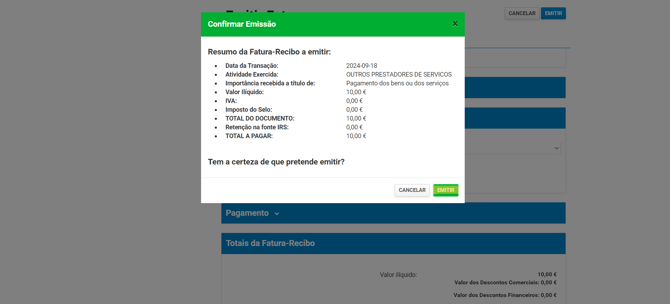
- Imposto de selo- The amount entered must always be zero.
- Base value - The amount must be equal to or less than the available value in the "Earnings" option.
If you invoice less than the amount available to you, the remaining balance is not lost: your balance is reduced only by the amount you have invoiced, and the remaining amount stays available for a subsequent invoice. -
After that, select "Emitir."
-
Invoice/Receipt Format - You should download the file in PDF format (if you are issuing an invoice-receipt on the Finance Portal, select the "imprimir economico" option).
- Submit the Invoice/Receipt - On the Bluwalk website, go to the "Earnings" option, click on "Submit Invoice," and attach the corresponding document. The Earnings page is also where you can find the description of step 5 and the entity to which you should issue it.
- Payment - After you submit your invoice/green receipt, BW proceeds with its validation and payment processing.
The process is normally completed within 48 business hours after submission, but this timeframe is not a guarantee, as it depends on the validation of the invoice/green receipt. The document may be approved or rejected.
Once the payment has been processed, the amount will be made available in your account.
You can track your invoice on the Earnings page of the portal: it is first validated and then paid. These are two separate steps, and you will only see there the invoices you have issued and shared with us.